

Open Source Claude Design — Fully Free AI Design System
WorldofAI breaks down what OpenDesign is, why it blew up on GitHub, and how to use it to generate landing pages, pitch decks, and mobile apps on top of the coding agent you already run — no single-model lock-in, no paid subscription.
This guide is the written companion to WorldofAI’s overview of OpenDesign — less an install walkthrough, more a “here’s what this thing actually is and why it matters” breakdown. We follow the framing from WorldofAI’s video, rewritten and brought up to date with the current release. Watch above for the live tour, or read on for the concept-first version: what OpenDesign is, why it took off, what you can build, and how to get started.
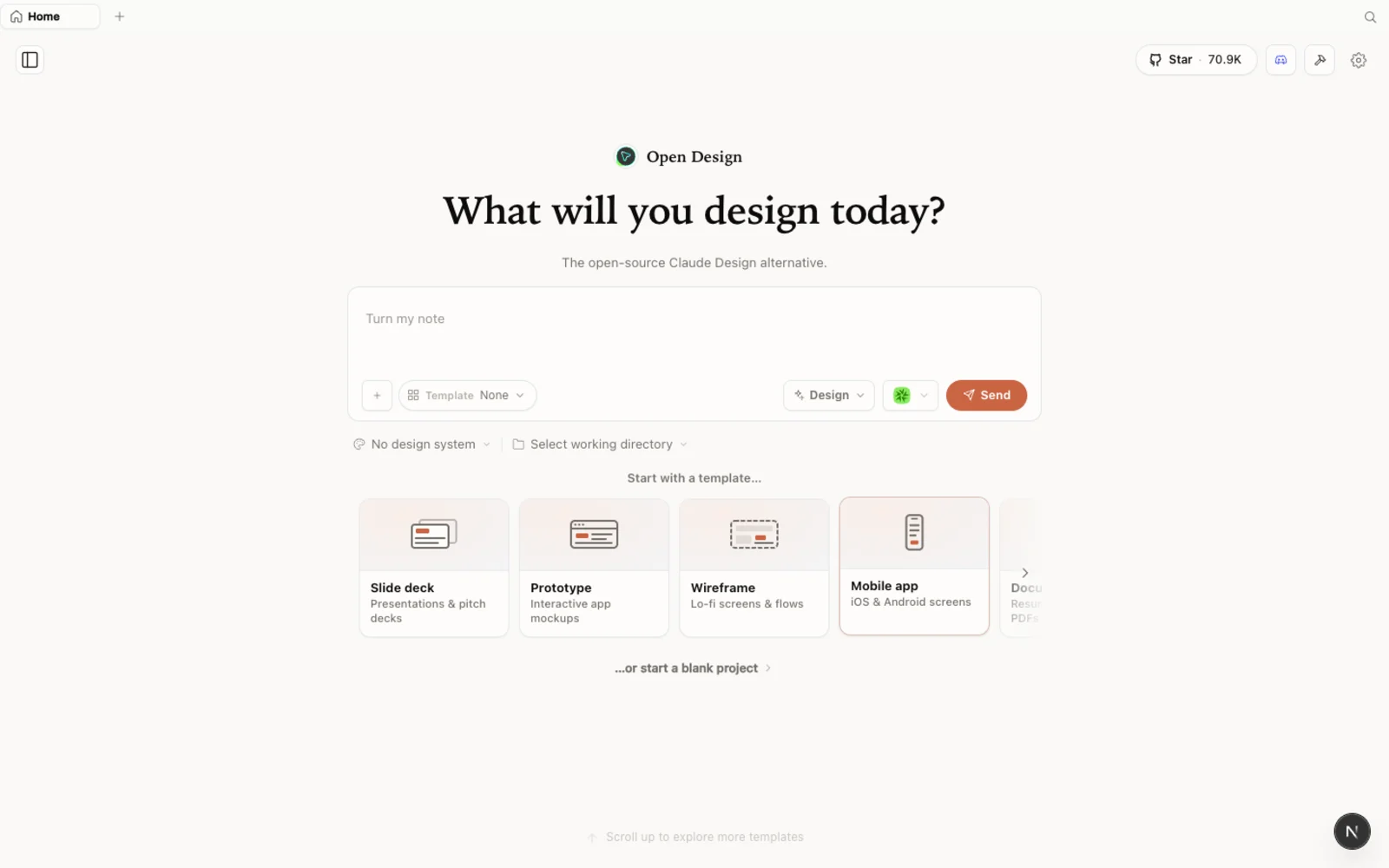 The OpenDesign workspace: prototypes, slide decks, images, and video all start from one place.
What is OpenDesign?
OpenDesign is an open-source, local-first design platform — an agent-native alternative to Claude Design and Figma. The core idea is simple but unusual: instead of being a closed app wired to one model provider, OpenDesign runs on top of the coding agent you already use.
Point it at a project folder and it scans your machine for installed, supported coding-agent CLIs — Claude Code, Codex, Cursor, Copilot, OpenCode, Qwen, and a long list of others — then lets you pick one to drive generation. That CLI becomes your design agent. You are not bringing your own key and paying a markup on top; you are bringing your own agent and running design through the subscription or plan you already pay for.
And it is genuinely local. There is a daemon underneath with real file-system access: it reads and writes files, runs commands, and persists state in a local SQLite database. Your designs live in your own folders, your projects are yours, and nothing has to round-trip through someone else’s cloud. On top of that local runtime sit export pipelines (HTML, PDF, slide decks, ZIP), Claude Design ZIP import, and MCP servers for agent-to-agent access to your design files — so this slots into the tools you already have rather than replacing them.
Why it took off
OpenDesign became one of the fastest-growing open-source projects on GitHub, and WorldofAI is clear about why. It comes down to three things.
It is open source and free. Apache-2.0 licensed — clone it, self-host it, read every line. There is no subscription gating access and no separate seat to buy. You only pay for the model and media usage of whatever agent and providers you connect. Claude Design, by contrast, sits behind a paywall and burns through rate limits fast; a couple of serious generations and you are already weighing the extra-usage bill.
It is bring-your-own-agent, not just bring-your-own-key. This is the part that flips the calculus. Most “open alternatives” still bolt you to one model — you swap an API key but you are still in someone’s ecosystem. OpenDesign detects the coding-agent CLIs already on your system and routes generation through whichever one you choose. Want to run on Codex with high reasoning effort? Prefer Claude Code, OpenCode, Qwen, or an efficient open model like MiniMax for web work? Your call, per project. No multi-model lock-in. And if you do not have a CLI set up, configure a BYOK provider; OpenDesign runs it through the isolated OpenCode adapter.
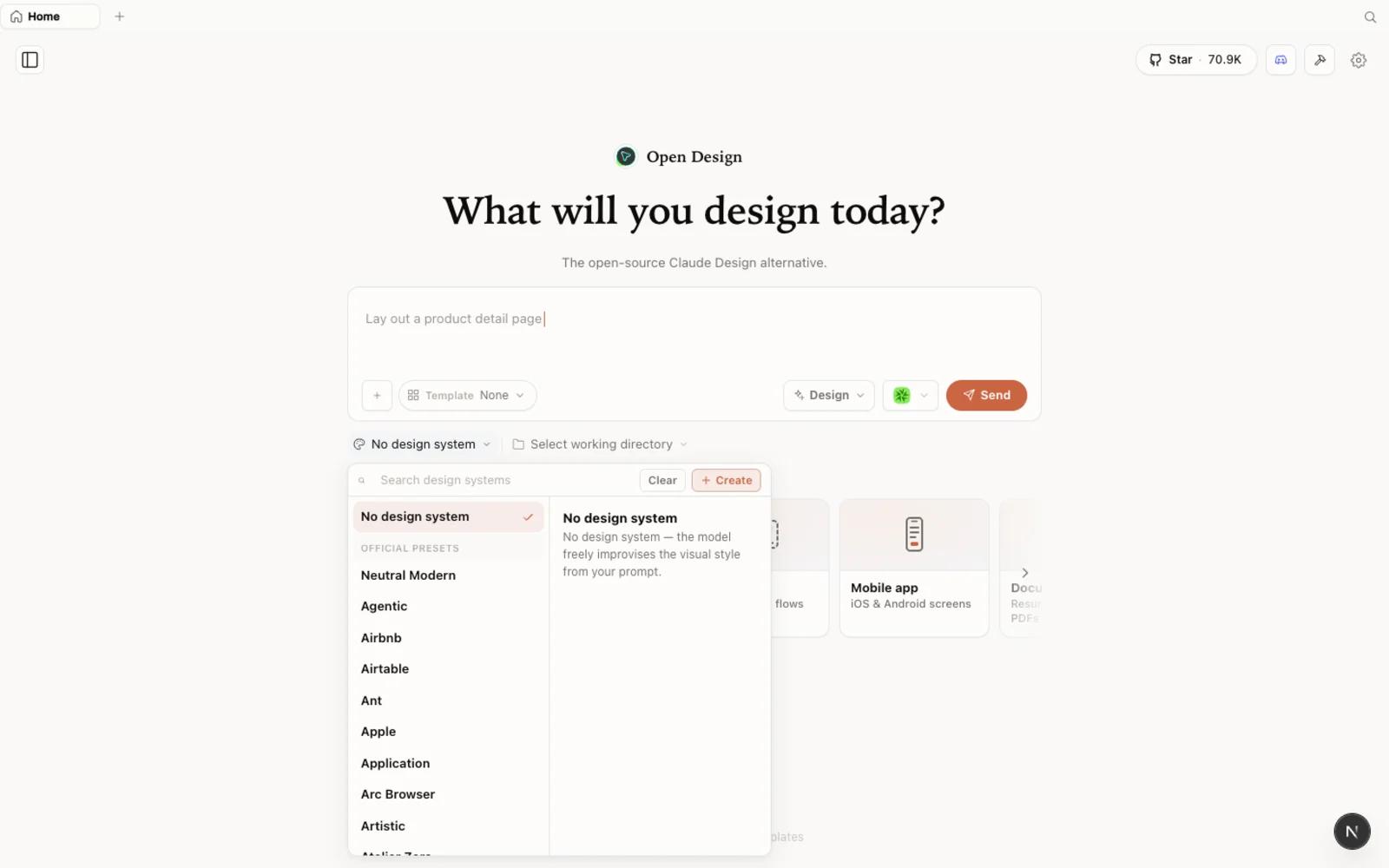 Real-world design systems you can snap into any project — so you are not starting from a blank canvas.
Design is built on coding, not just an image model. This is the quiet differentiator. OpenDesign ships a library of composable skills and full design systems, so you are not generating a one-off picture — you are generating real, structured, production-grade design. Because the output is built the way code is built, it goes from design straight to production: hand the generated files to another coding agent and keep building. WorldofAI’s verdict is that the output quality holds up against Claude Design while doing more — and it does it without trapping you in one vendor.
What you can build
OpenDesign is not a single-trick UI generator. From one workspace you can produce:
- High-fidelity prototypes and landing pages — full styled pages, not just wireframes, built against a real design system.
- Slide decks and pitch decks — structured, animated presentations with proper sections.
- Magazine and editorial layouts — long-scroll editorial pieces, annual-report-style documents, and other rich layouts.
- Mobile app interfaces — polished app UIs that read as designed, not auto-generated.
- Images — generated assets through media providers you connect (for example OpenAI’s image model).
- Video and audio — motion and sound from the same place, again through your own provider keys.
The gallery of examples baked into the app — landing pages, slide decks, design systems — makes the range obvious at a glance. It all comes out of one tool, driven by your chosen agent, and you can mix models freely rather than being restricted to one provider.
Getting started
You have three ways to run OpenDesign. Pick the one that fits you:
| Path | Best for | What you need |
|---|---|---|
| Desktop app | Most people — zero config | None. Download and open. |
| Run from source | Developers who want to read or modify the code | Node ~24, pnpm (via Corepack) |
| Install into your agent | People who live in the terminal | An existing coding-agent CLI |
Desktop app (recommended). Go to open-design.ai, download the desktop build for your platform, and open it. No Node, no pnpm, no clone — the app auto-detects the coding-agent CLIs on your PATH and loads the built-in skills and design systems for you.
Run from source — the path WorldofAI takes in the video — is four commands:
git clone https://github.com/nexu-io/open-design.git
cd open-design
corepack enable && pnpm install
pnpm tools-dev run web
Then open the local URL it prints (the port is assigned dynamically — copy the one from your terminal, don’t assume a fixed number). You need Node ~24; Corepack will select the pinned pnpm version for you.
Install into your coding agent — to call OpenDesign as a skill inside your agent without ever opening the GUI:
od mcp install <agent>
# od ships with OpenDesign; <agent> = claude | codex | cursor | copilot | opencode | kiro | …
The first launch opens the welcome daemon, where you configure the basics: pick a default agent and model (the app auto-detects local CLIs, or plug in an OpenAI-compatible key), optionally add media-provider keys for image/video/audio, and wire up any MCP services. Save, get started, then create a prototype — give it a name, choose High fidelity over wireframe, and write your brief. The agent asks a few clarifying questions (platform, article angle, design direction), plans its work, reads the design system, and builds the artifact. In WorldofAI’s run, Codex produced a clean newsletter landing page in about five minutes — billed against his own Codex plan, routed entirely through OpenDesign’s skills.
Tips
- Pick the right agent for the job. OpenDesign routes through whichever CLI you select — try an efficient model like MiniMax for fast web work, or set Codex to high reasoning effort for the most polished output.
- Start with high fidelity when you want to see the real thing; drop to wireframe only to block out structure quickly.
- Bring your own media keys only for the providers you actually use — you do not need all of them to start designing.
- You do not need a design system first. Begin from a built-in one, import a Claude Design ZIP, or let OpenDesign infer sensible defaults.
- Designs stay with the project folder. Organize your work by running OpenDesign against the right directory.
FAQ
Is OpenDesign really free? Yes — it is open source under Apache-2.0, with no subscription. You only pay for the model and media usage of whatever agent and providers you connect.
How is “bring your own agent” different from “bring your own key”? Bring-your-own-key still ties you to one provider — you just supply the key. OpenDesign detects the coding-agent CLIs already on your machine and lets you choose which one drives generation, per project. No single-model lock-in.
Do I have to use Claude? No. Claude Code is one option among many — Codex, Cursor, Copilot, OpenCode, Qwen, and more are all supported, and you can switch agents from the workspace whenever you like.
Is it only for UI mockups? No. The same workspace produces landing pages, slide and pitch decks, magazine layouts, mobile app interfaces, images, and video — and because the design is built on code, it goes from design straight to production.
This written guide is based on WorldofAI’s overview of OpenDesign. Watch the full video above, and subscribe to WorldofAI for more of the latest AI tools and workflows.